

Executive summary
We started with AWS Cost Optimization Hub and implemented its recommendations. That delivered real value, but our ~$150,000/month AWS footprint still had meaningful cost drift. This blog focuses on the $11k/month in savings we found, in addition to the ~$15k/month we achieved by implementing Cost Optimization Hub recommendations.
The gaps were not simply a matter of rightsizing; rather, they resulted from service defaults, operational issues and governance blind spots that recommendation engines may not consistently identify.
- USD $11k per month in ongoing cost savings, which is above and beyond the Cost Optimization Hub recommendations (about USD $133k annually)
- Approximately 7.4% reduction compared to our $150k per month baseline spending
- Established a repeatable operational cadence, including ownership, reviews and guardrails, to minimize reversion
- All changes were validated with application owners to prevent significant performance issues and maintain necessary audit and security controls
Equally important, a cost investigation revealed an operational risk that had gone unnoticed for months: silent backup lifecycle failures, which resulted in the accumulation of about 50 TB of data and increased storage and backup expenses. This highlighted a valuable lesson: effective FinOps requires both operational hygiene and cost optimization.
Why tool-led FinOps plateaus
AWS Cost Optimization Hub (and similar tooling) is an essential starting point. It’s strong at resource-level inefficiencies: idle resource detection, rightsizing, graviton migration opportunities and commitment-based savings such as savings plans and reserved instances.
These tools are less likely to fully capture environment-specific governance drift, duplicate controls, inconsistent retention settings, temporary solutions that become permanent and processes that no longer function as intended. These issues can lead to gradual increases in costs and, at times, real risks to reliability or compliance.
After addressing the obvious improvements, it is important to consider a new set of questions:
- Are systems operating as intended, end-to-end?
- Do current defaults match actual usage patterns, or are they based on outdated assumptions?
- Who is responsible for costs and who ensures that controls remain effective?
This case study outlines what we uncovered by adopting this broader perspective.
What we did differently (and why it matters)
The hidden cost of “good enough” cloud governance
Across this six-month initiative, we consistently observed a recurring trend: leaving defaults unexamined and assumptions unchallenged leads to increased costs and risks over time.
- Operational debt accumulates much like technical debt. During a review of storage costs, we identified a gap in the backup lifecycle: deletion and retention were not functioning as expected. It's important to ask not just “is it configured?” but also “does it function properly from end to end?”
- Cloud sprawl is frequently an organizational issue rather than just a technical one. We discovered multiple CloudTrail trails set up by different teams. While each setup made sense individually, together they led to unnecessary expenses.
- “Best practice” depends on context. Although AWS Graviton typically offers strong price and performance, it is not always a drop-in replacement. We chose AMD for its lower delivery risk and quicker integration into our x86 pipeline.
- FinOps signals engineering excellence. Having clear ownership, verified controls and repeatable processes contributes to both cost efficiency and operational excellence.
Why this is important now: Cloud spending is rapidly increasing due to modernization, data platforms and AI/ML initiatives. Without an operating model that regularly validates architecture, controls and processes, organizations can accumulate avoidable costs and unexpected operational risk even when they use recommendation engines.
Suggested action: Use Cost Optimization Hub as your starting point and supplement it with ongoing architecture and operations reviews (such as storage lifecycle, logging practices, network management and backup checks) that have defined ownership and measurable safeguards.
The FinOps operating model we used
We adopted a straightforward target operating model, focusing on sustainable improvements rather than a one-time cost reduction exercise. The framework was intentionally kept simple:
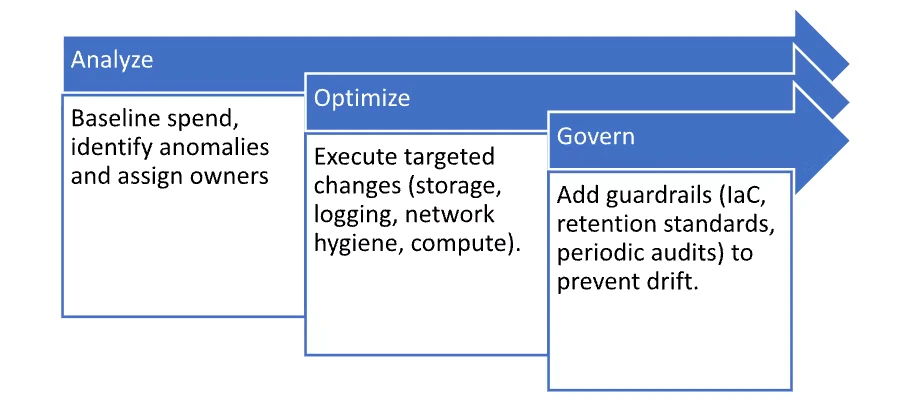
We also established a regular governance cadence. Weekly, monthly and quarterly cost reports were reviewed in a FinOps forum with the FinOps team, service owners, architects and platform engineering.
Cost anomaly and budget alerts were also configured and the FinOps team worked with application owners to identify root causes, agree on corrective actions and track them to closure.
Where did the $11k/month savings come from?
- Storage: S3, EFS and backup lifecycle
S3 tiering, intelligent tiering and expiration
Finding: ~50 TB of data sat in S3 Standard longer than needed. Using S3 Storage Lens and bucket-owner reviews, we mapped access patterns and retention requirements for each workload.
Remediation:
- Added S3 lifecycle rules to transition objects to Standard-IA and then archive tiers where appropriate
- Applied lifecycle policies for expiration (deletion) of data for buckets with no long-term retention requirement
- Enabled S3 Intelligent-Tiering for buckets with unpredictable access patterns
- Savings: ~$1,200/month
EFS lifecycle management (IA/Archive)
We enabled EFS Lifecycle Management to transition infrequently accessed files to EFS-IA and (where eligible) EFS Archive, aligned to workload access patterns.
Savings Achieved: ~$600/month
Cost optimization as risk discovery (RMAN → EFS backup lifecycle)
Some of the most valuable FinOps findings don’t start as “optimization ideas.” They start as anomalies that indicate a process is drifting—or failing silently. In our case, investigating an unusually large EFS footprint uncovered a backup lifecycle issue that had persisted for nearly two years.
Finding: An EFS file system used for Oracle RAC (Flashgrid on EC2) RMAN backups had grown to ~60 TB. The workload team believed RMAN retention was enforced (delete after 35 days), but verification showed backups were accumulating.
Root cause and fix: RMAN deletion depended on the CROSSCHECK command, which was failing because one backup channel configuration referenced missing/invalid AWS IAM keys. Backups were still being created on EFS, but the lifecycle cleanup never completed. After correcting the channel configuration and validating the CROSSCHECK/delete behavior end-to-end, we removed ~50 TB of obsolete backups.
Additional benefit: Because the EFS file system was also protected by AWS Backup, reducing the source footprint also reduced downstream backup storage.
Savings Achieved: ~$2,000/month (EFS + reduced backup storage)
Key lesson learned: Don’t just audit backup creation—audit the full lifecycle (retention, deletion, restores) and reconcile stored backup volume against policy on a fixed cadence.
What’s transferable vs. context-specific: The tooling here (RMAN, EFS) is specific, but the failure mode is common: retention assumptions go unvalidated. Treat backup lifecycle verification as a control with explicit ownership, tests and periodic evidence.
AWS Backup lifecycle tiering (warm → cold storage)
AWS Backup supports lifecycle transitions to cold storage for eligible resource types. This can materially reduce long-retention backup costs, but it typically requires minimum retention and may incur early deletion fees. Validate eligibility and compliance requirements for your workloads.
Findings:
- All the backups were going to the standard vault
- These backups were rarely accessed, but were retained for compliance
Remediation:
- Configured policies to move backups to Cold Storage for EFS
- AWS Backup cold tier costs ~80% less than warm storage ($0.01/GB/month vs. $0.05/GB/month)
- Savings: ~$500/month
- Logging: CloudWatch logs retention (and choosing the right log class)
CloudWatch Logs can quietly grow into a meaningful line item. Our main issue wasn’t ingestion—it was retention defaults.
Finding: Many log groups were set to Never Expire, even though the same logs were already centralized to S3 and Splunk for longer retention and search.
Remediation: Standardized CloudWatch Logs retention to 2 weeks for most application logs, retaining longer periods only where explicitly required.
Savings Achieved: ~$800/month
Note on AWS CloudWatch log classes: CloudWatch Logs provides several log classes, such as Standard and Infrequent Access, each with different price/feature trade-offs. We reviewed these options and determined that maintaining strong retention practices provided the best return on investment in our environment. If your workflow depends on ad-hoc queries, be sure to assess the cost/feature impact before changing log classes.
- Auditing the auditors: CloudTrail consolidation
Finding:
- 6 duplicate trails logging the same management events. These were duplicating data in both CloudWatch and S3.
- Unnecessary data event logging on non-critical S3 buckets.
Remediation:
- Consolidated to a single organization-wide trail delivered to a centralized S3 bucket (with appropriate immutability/retention controls).
- Reduced data-event logging, keeping it enabled only for buckets/workloads where it was required for security or investigation needs.
- Savings Achieved: ~$300/month
Note on AWS CloudTrail: AWS CloudTrail costs are influenced by factors such as the number of trails, regions, types of events (management or data) and any additional features. For FinOps, it is important to note that duplicated trails and logging a wide range of data events can lead to unnecessary expenses.
Consolidation should preserve security requirements such as centralized ownership, encryption, log file validation, restricted access, retention controls and immutability where required.
- Idle networking costs: Transit gateway hygiene
Our network testing accounts had dozens of idle Transit Gateway (TGW) attachments left running "just in case."
Justification: "It's too much work to reconfigure these for occasional tests."
Finding:
- TGW attachments incur hourly charges (varies by region) plus data processing charges per GB
- Data processing: $0.02/GB processed
- Across 20+ idle attachments in test accounts, this translated into ~$700/month of avoidable spend
Remediation:
- Moved to Infrastructure as Code using CloudFormation templates
- Created reusable templates for test environments, including TGW attachments, route tables and security groups
- Team now spins up environments on demand and destroys them when done
- Savings Achieved: ~$700/month
- Compute: Intel to AMD (x86) rightsizing
Cost Optimization Hub often recommends Graviton for excellent price/performance, but Graviton isn’t always a drop-in replacement for x86 environments. To reduce delivery risk and shorten time-to-savings, we prioritized AMD-based x86 instance families (for example, the “*a” variants) in which performance and compatibility met the workload's needs.
Savings achieved: ~$5,000/month
FinOps decisions should consider the practical challenges of implementation, not just potential savings. In our case, AMD provided quick savings with little need for engineering adjustments and we continue to plan for Graviton adoption in future projects where it aligns with our development goals.
Savings summary (Beyond Cost Optimization Hub)
| Area | What changed | Monthly savings |
| S3 | Lifecycle transitions (IA/archive), intelligent tiering and expiration where allowed | $1,200 |
| EFS | EFS lifecycle management + cleanup of obsolete backup data | $2,600 |
| AWS Backup | Lifecycle tiering to cold storage for eligible long-retention backups | $500 |
| CloudWatch Logs | Standardized retention; kept longer only where required | $800 |
| CloudTrail | Removed duplicate trails; narrowed data-event logging to required buckets | $300 |
| Transit Gateway | Removed idle test attachments; moved testing setups to on-demand IaC | $700 |
| EC2 (Intel → AMD) | Migrated eligible workloads to AMD x86 families to reduce cost with low delivery risk | $5,000 |
| Total | $11,100/month |
The bottom line
FinOps is more than just a set of tools—it's about building a culture and consistent operating practices. The Cost Optimization Hub provides a solid foundation, but long-term results depend on verifying system behavior and making best practices the standard.
- Review architecture and look for duplication (such as multiple teams addressing the same issues separately)
- Set standard defaults (for retention, lifecycle, tiering) and ensure exceptions are explicit
- Test operations thoroughly (including backup deletion and restore, tests not just checking configurations)
- Automate maintenance using infrastructure as code and regular reviews to avoid drift
Relying solely on tool recommendations may overlook issues such as redundant logging controls, excessive log retention, unused network resources and broken lifecycle processes. Collaboration between experienced engineers and FinOps teams is essential to address these challenges.
Quick checklist
Here are some additional common areas to look into that aren't covered in the blog but are worth investigating:
- Idle Elastic IPs/public IPv4 addresses, unused load balancers, NAT gateways, VPC endpoints
- Data transfer costs (cross-AZ, cross-region, internet egress)
- Database and storage management: DynamoDB TTL, tiering, RDS storage autoscaling and snapshot retention
- Container best practices: ECR lifecycle policies, managing oversized EKS nodes and log ingestion controls
- Purchase strategies: review Savings Plans/RI coverage targets and exception handling
- Replatforming or rearchitecting: migrating to open-source OS and databases, moving to serverless, adopting Graviton and utilizing spot instances
- Architecture Review: Aligning high availability, backup and DR strategies to the current criticality tier of the application. For example, do we still need a warm standby or an active-active setup when the application's criticality is revised to a lower tier?
- GenAI Specific: Model right-sizing, prompt optimization, control model response, prompt caching, semantic caching, intelligent prompt routing and batching